Parent guide · Getting started
Confirm or withdraw consent for a 14–17 learner
A learner aged 14–17 can use MomentDesk only while a parent or guardian's consent stands.
Parents and guardians of learners aged 14–17.
What you end up with
Your child can sign in, and you can stop that at any time.
What to do
Find the consent panel
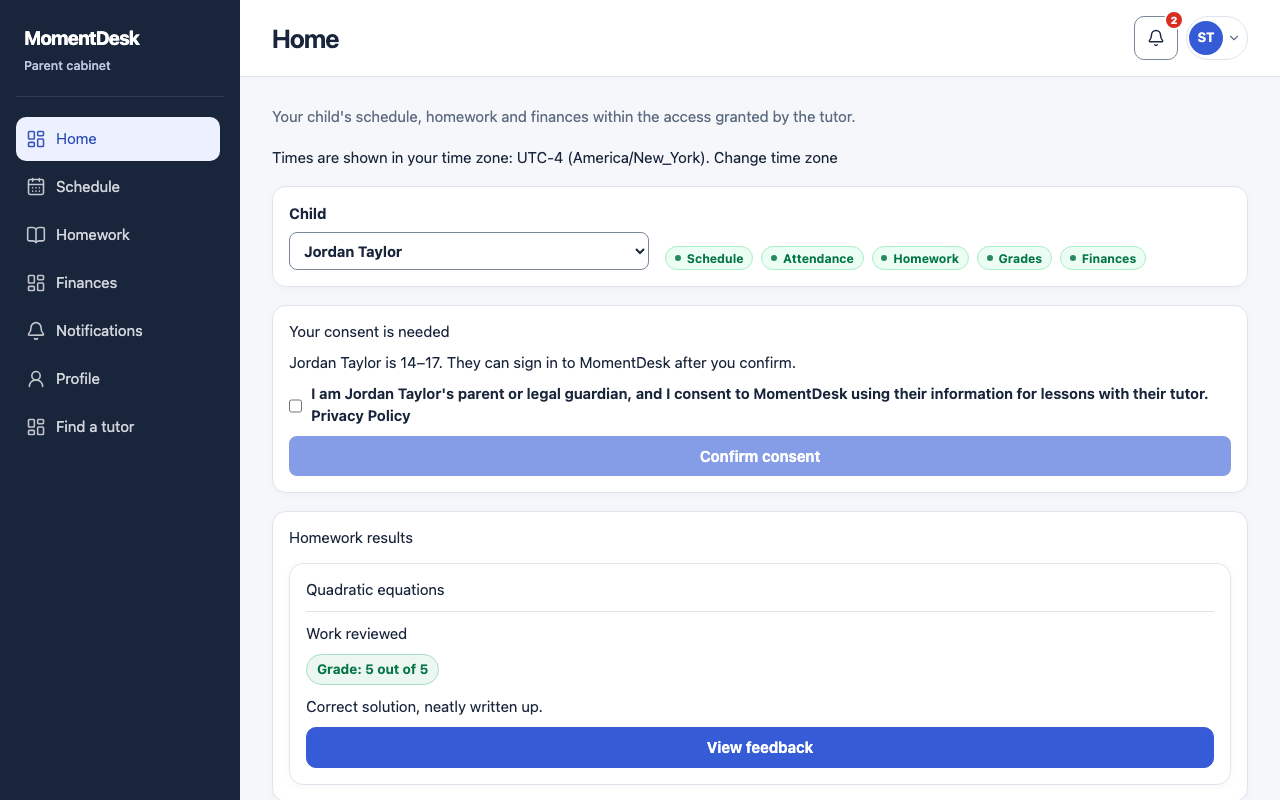
Your consent is needed appears on your home page for a learner aged 14–17 who is waiting for it. You can also give it while accepting the invitation.
Read the statement
It reads: you are the learner's parent or legal guardian, and you consent to MomentDesk using their information for lessons with their tutor. The Privacy Policy is linked beside it.
Confirm
Tick the statement and choose Confirm consent. The panel then reads that you have confirmed consent for that learner, and they can sign in.
Withdraw when you want to
Withdraw consent is in the same place afterwards. MomentDesk warns that the learner will not be able to sign in until consent is given again, and asks you to confirm.
Give it again later
Confirming again restores access. Lessons, homework and records are untouched while consent is withdrawn.
Good to know
- Withdrawal blocks the learner’s next authenticated request and new sign-in, including password and linked external accounts.
- Only a parent or guardian can give this consent, in their own account. The tutor cannot give it for you.
- MomentDesk is not available for learners under 14.
Questions
Does withdrawing consent delete my child's work?
No. Lessons, homework and records stay where they are. The learner simply cannot sign in until consent is given again.
Can each parent give consent separately?
While consent is already active, another confirmation keeps the original record. After withdrawal, a new confirmation records consent again.