Tutor guide · Homework
Review and grade homework
The review decides what the student does next: move on, or fix something specific.
Tutors marking work between lessons.
What you end up with
The student sees a clear result and knows whether another attempt is expected.
What to do
Open what is waiting
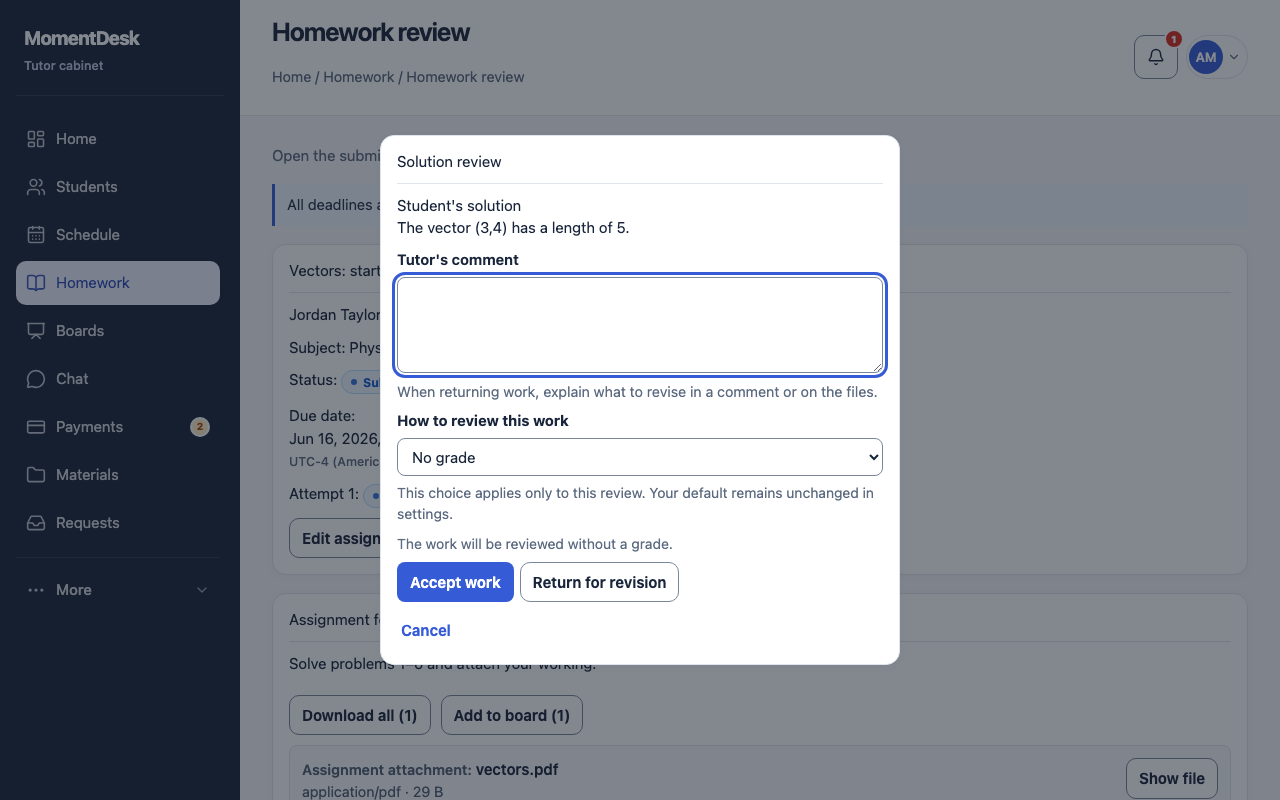
The Needs review view lists submitted work. Open an assignment and choose Review and grade.
Read the submission
Homework review shows the student's text and files, when it was submitted and whether it was late. Earlier attempts stay under the previous submissions.
Comment where it matters
Write a Tutor's comment for the work as a whole, and add file comments against a specific file when the problem is in one place.
Give a grade if you use one
Choose How to review this work: no grade, a 5-point or 10-point scale, or emoji. This applies only to the current review. Accepting in a graded mode requires a grade; returning for revision does not. Select no grade to accept without one.
Accept or return
Accept work closes the assignment; the student cannot resubmit. Return for revision sends it back with your comment and opens a new attempt.
Undo if you decided too fast
Undo acceptance reopens an assignment you accepted by mistake.
Good to know
- Answer-key exercises can check supported answers automatically. You remain responsible for interpreting the work, reviewing it and choosing any grade.
- A returned assignment keeps every earlier attempt, so the student can see what changed. Review history records earlier review decisions; check it before revising a decision.