Tutor guide · Getting started
Use the tutor home page
Home answers one question: what still needs you today.
Tutors using MomentDesk day to day.
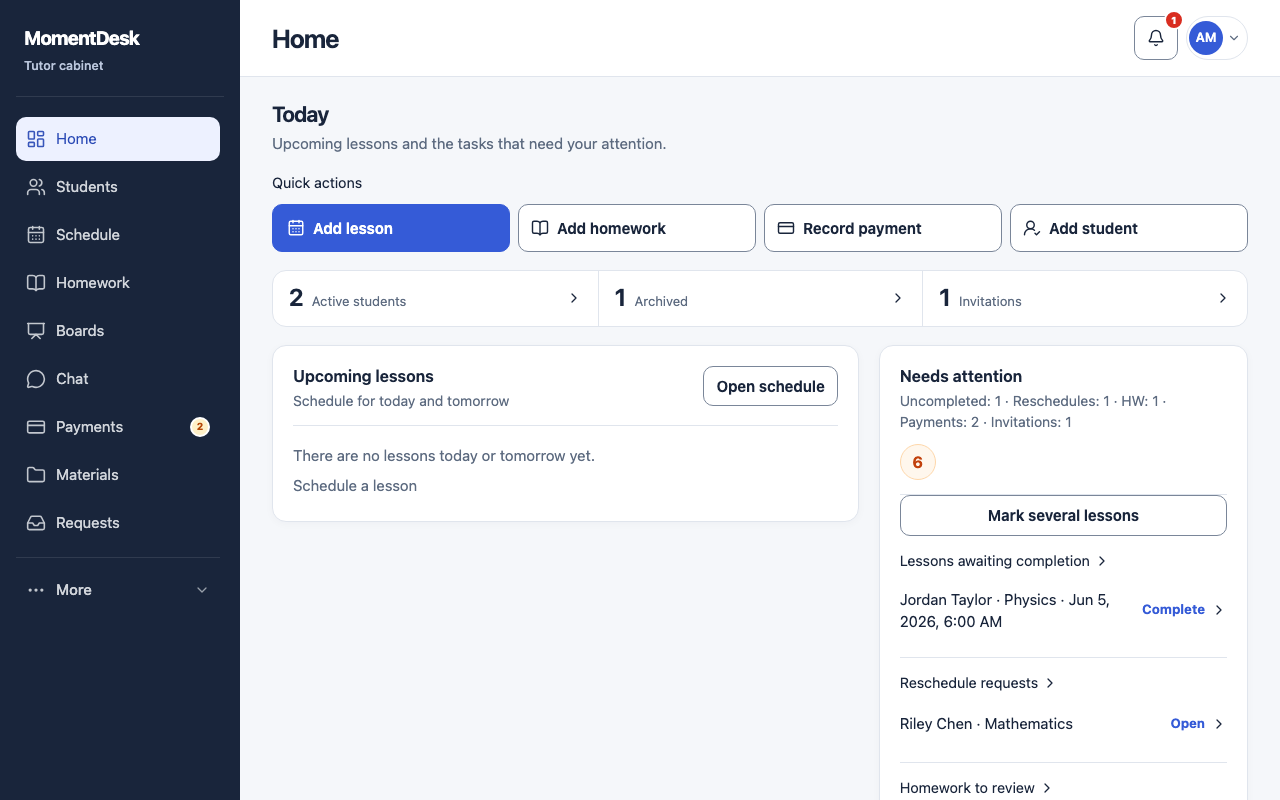
What you end up with
Unmarked lessons, reschedule requests, homework and payment marks are collected in one panel.
What to do
Read Upcoming lessons
Upcoming lessons shows the lessons scheduled for today and tomorrow. Open schedule takes you to the full calendar.
Use the quick actions
Add lesson, Add homework, Record payment and Add student open the same forms as the menu, with one click from here.
Work through Needs attention
The panel counts what is outstanding: lessons awaiting completion, reschedule requests, homework to review, payments to confirm and pending invitations. Each row opens the exact record.
Mark several lessons at once
Mark several lessons opens the list of lessons that have already passed without a result. Confirm which ones took place; a calendar entry alone is not a record that a lesson happened.
Check the counters
The three counters show active students, archived students and pending invitations. A stuck invitation count usually means a student has not opened their personal link yet.
Good to know
- The bell in the top bar opens the notification center; the badge counts unread notifications.
- The badge on Payments counts payment marks students sent that you have not reviewed.