Tutor guide · Homework
Write a homework brief a learner can follow
“Practise this topic” leaves too many decisions to the learner. Explain what to do, what to submit and how you will check it.
Tutors assigning independent work between lessons. The template also works in a document, email or learning platform.
What you end up with
The learner can begin without another message and knows what a complete submission should contain.
What to do
Choose one achievable goal
Describe the skill to practise in one sentence. Connect it to the last lesson and choose an amount of work that fits the learner. Example: explain how to calculate the length of a two-dimensional vector. Avoid promising a fixed improvement from completing one task.
Specify the action and the materials
Name the exercises, pages or source links and say whether the learner should calculate, explain, record or revise. Check that they can open the material. State whether notes or a calculator are allowed and which part should be completed independently.
Define the submission and deadline
Say what to submit: a short text, a readable photo or a named file. Add a deadline with date, year, time and zone. Include where to ask for help and how to report an inaccessible file. A suggested working time is an estimate, not a promise that every learner will finish within it.
Copy the complete brief
Template: “Goal: [one skill]. Task: [exact exercises and required explanation]. Materials: [accessible source/page/link; allowed aids]. Submit: [text/files and where to send them]. Deadline: [date with year, time and zone]. I will check: [specific criteria]. Estimated work: [time range]. If you get stuck: [help channel and what to include].” Replace every field; remove an optional working-time estimate if it would be misleading.
Compare with a worked example
Example: “Goal: explain a vector-length calculation. Task: calculate the length of (3,4), write the formula and show the substitution and result. Use today's lesson notes; do not copy only the final answer. Submit a short text in the homework answer field. Deadline: 19 October 2026, 18:00 America/New_York. I will check the formula, calculation and explanation. Estimated work: 10–15 minutes. If stuck, send me the step you tried in our lesson chat.” This fictional example is for adaptation, not an actual assignment.
Read it as the learner, then review against it
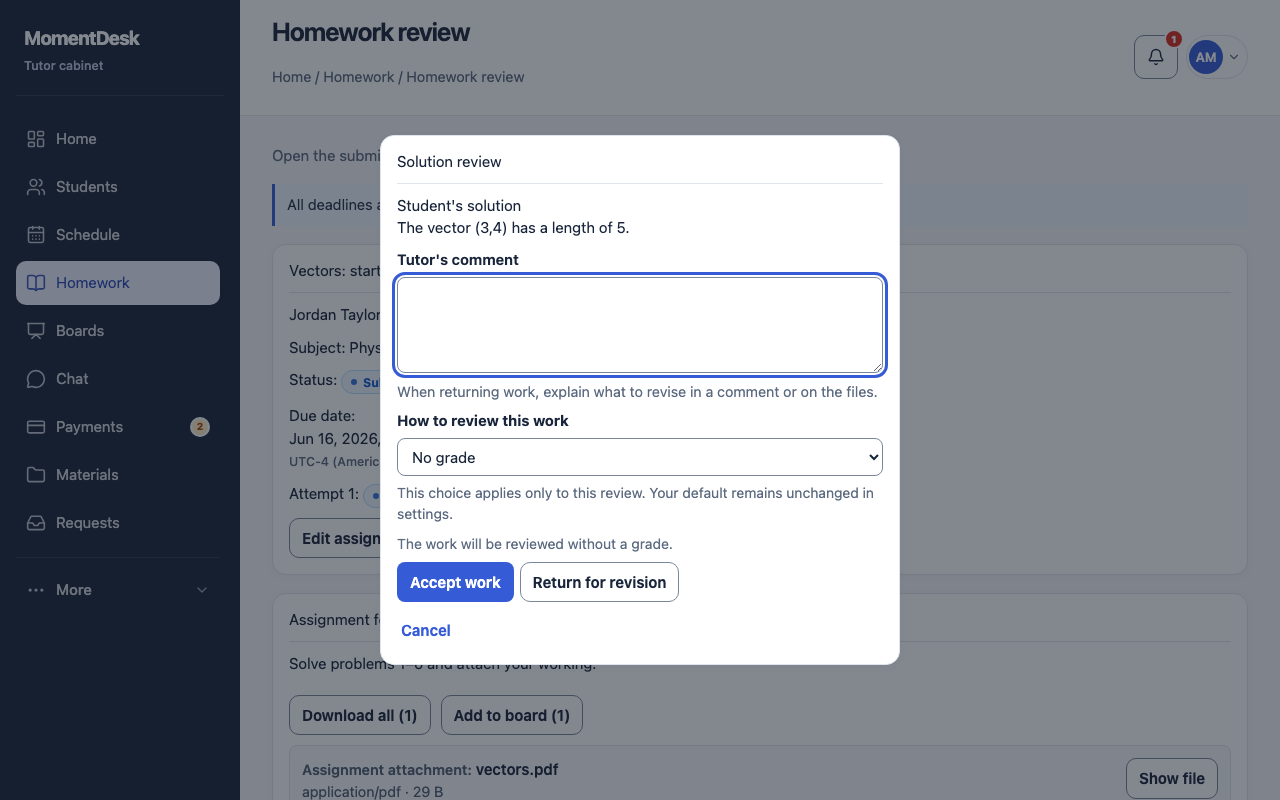
Before assigning, check that the learner can identify the first action, open the material and understand the expected result. In MomentDesk, create the assignment and later review the submitted text and files against the stated criteria. The screenshot shows the review stage. Accept or request a revision with a specific next action; a written brief does not provide automatic grading.
Good to know
- Use accessible materials you have permission to share. A broken link or unreadable photo is missing evidence, not proof that the learner misunderstood the topic.
- If a lesson moves, explicitly decide whether the homework deadline moves too. Keep the original brief available when giving feedback so the criteria stay consistent.
Questions
How detailed should the brief be?
Include enough detail for this learner to start independently. One clear goal and a small complete task are often easier to follow than a long list of unrelated exercises.
Do I need to give a grade?
No. You can check the agreed goal and provide concrete feedback. In MomentDesk, the review offers a no-grade mode; choose acceptance or revision deliberately.